

Natural Language Processing (NLP)
Python project, Keras.
This article show how to use neural networks to detect the kindness of sentences:
- Build the dataset (good practices, tokenization, word to vector),
- Neural network implementation,
- Training and evaluation with F1-score
GitHub link: https://github.com/Apiquet/NLP
Table of contents
- Dataset
- Find data
- Good practices
- Word to vector
- Split train – test
- Model implementation
- Training
- Test
1- Dataset
This section will explain all I learned from the web about building a dataset for NLP. I will show some good practices, the essential steps of tokenization and finally the recommended practice of turning the words into vectors.
1a- Find data
First, you need to find data according to the task you want to achieve with your neural network. In my case, I wanted to train one to evaluate the kindness of a sentence. For instance, thanks to such a network, we could moderate comments in a social media.
I found it on Kaggle at the following link: https://www.kaggle.com/chaitanyarahalkar/positive-and-negative-sentences#negative.txt
Once you have got your data, you need to process it. Mine was split into two parts, the positive and negative ones. I had to merge them with a label, 1 for positive sentences, 0 for the negative ones:
# read the txt files
positive_sentences = open('data/positive.txt', 'r')
negative_sentences = open('data/negative.txt', 'r')

# convert to list and remove line breaks
positive_list = [line.replace('\n', '') for line in positive_sentences.readlines()]
negative_list = [line.replace('\n', '') for line in negative_sentences.readlines()]

# concat both into a dataframe
positive_df = pd.DataFrame({'sentences':positive_list})
positive_df['feeling'] = 1
negative_df = pd.DataFrame({'sentences':negative_list})
negative_df['feeling'] = 0

data = pd.concat([positive_df, negative_df])
1b- Good practices
Several things must be done. First, shuffle and lowercase the data:
# lower case
data['sentences'] = data['sentences'].str.lower()
# shuffle
data = data.sample(frac=1).reset_index(drop=True)
Then, remove the unnecessary characters. Below is an example to remove punctuation:
import string
def remove_punctuation(s):
    s = ''.join([i for i in s if i not in
    frozenset(string.punctuation.replace("'",''))])
    return s

# remove ponctuation except "'"
data['sentences'] = data['sentences'].apply(remove_punctuation)
We could also remove words such as ‘a’, ‘an’, ‘the’, etc.
Once it’s done, the next step is the tokenization:
tokens = [ s.split() for s in data['sentences']]
Here we got list of list of words, so each element is a word.
1c- Word to vector
i) Find the dictionary
The final step, which is hardly recommended, is to use a “word to vect” strategy. After few research online, I decided to use gensim lib which provides a binary file to convert words to vectors:
import gensim.downloader as api
from gensim.models import KeyedVectors

NEED_DOWNLOAD = False
if NEED_DOWNLOAD:
    word_vectors = api.load("glove-wiki-gigaword-100") # load pre-trained word-vectors from gensim-data
    word_vectors.save('data/glove-wiki-gigaword-100.bin')
else:
   word_vectors = KeyedVectors.load('data/glove-wiki-gigaword-100.bin')
A word to vect object allows to convert similar words to similar vectors. It means that close words such as “car” and “automobile” have close vector encoding.
But it goes much further, the whole architecture is designed as if you take the vector “France”, you add the vector “Germany”, then you subtract the vector “Paris” you will get a vector similar to “Berlin”! It means that the links between words are also encoded! This will help a lot the neural networks to understand sentences. For instance, if it has already learned the meaning of “car”, understand the meaning of a sentence that contains “automobile” won’t be hard.
Note: KeyedVectors object has methods such as “similarity” (to score the similarity between words) or “doesnt_match” to find an outlier in a list of words.
ii) convert dataset to vector
First, we need to know the number of words in our longest sentence because we will create a train set with the same size for each sentence by adding zeros to their ends. The code below is to get an overview of the length of the sentences we have in our dataset:
# display distribution of the sentences' sizes
import pandas
from collections import Counter

sizes = [len(el) for el in tokens]
sizes_counts = Counter(sizes)
df = pandas.DataFrame.from_dict(dict(sorted(sizes_counts.items())), orient='index')
df.plot(kind='bar', title='Number of words per sentence',legend=None, figsize=(10,5));
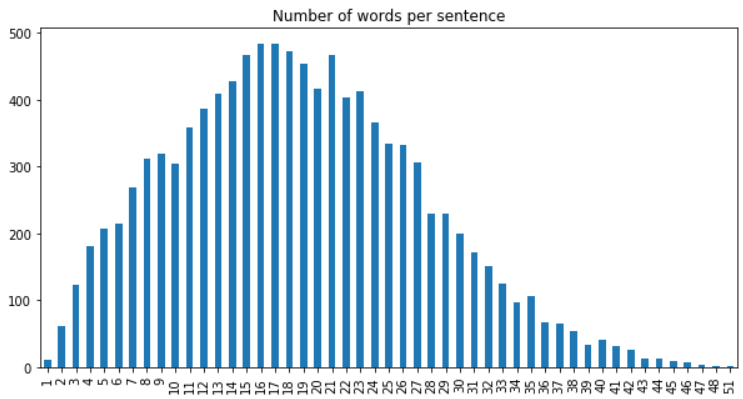
We can see that most of my sentences have between 13 and 23 words. The longest one has 51 words. All the sentences with less than 51 words will get N zeros at its end with N = 51 – sentence’s length.
# lib to print progress bar
from tqdm import tqdm

# get index of each word in word_vectors
keys = word_vectors.vocab.keys()
vocabIndex = {}
for w in keys:
	vocabIndex[w] = word_vectors.vocab[w].index

X = []
y = []
MAX_LENGTH = max(sizes_counts, key=int)
WORD_EMBEDDING_DIM = 100

# convert all tokens (words) to vectors
for el in tqdm(tokens):
    row = np.zeros((MAX_LENGTH, WORD_EMBEDDING_DIM))
    words = el
    for j in range(min(MAX_LENGTH, len(words))):
        if words[j] in word_vectors.vocab:
            indexVal = vocabIndex[words[j]]
            row[j] = word_vectors[words[j]]
    X.append(row)

# create X and y
X = np.asarray(X)
y = np.asarray(data['feeling'].values)
1c- Split train – test
The last step is to split our data X, y to train and test sets:
from sklearn.model_selection import train_test_split
TEST_SIZE = 0.3
X_train, X_test, y_train, y_test = train_test_split(X, y, test_size=TEST_SIZE)
assert abs(y.shape[0]*TEST_SIZE - y_test.shape[0]) < 1
assert abs(X.shape[0]*TEST_SIZE - X_test.shape[0]) < 1
2- Model implementation
Long Short Term Memory (LTSM) is the key to add to your model. You can use it as a basic cell and you will get better results (faster convergence, and will detect long-term dependencies). It is composed of a front door where it learns important entries, a forgetting door where it learns what it should keep in memory in the short and long term, and an exit door to know what to return. A peephole connections was also added to the LSTMs to allow doors to access long-term data.
We could also use GRU cell (Gated recurrent unit): recurring unit cell at door: simplified version of LSTM but with equally good performance: combined forgetting and entry doors, the exit door was removed.
Below is a basic implementation of a neural network with LSTM:
from keras.models import Sequential
from keras.layers import Dense, LSTM, SpatialDropout1D, Dropout
from keras.layers.convolutional import Convolution1D
from keras.layers.convolutional import MaxPooling1D, MaxPooling2D
from keras.layers.embeddings import Embedding

model = Sequential()
#model.add(Embedding(TOP_WORDS, 100, input_length=MAX_LENGTH))
model.add(Convolution1D(nb_filter=32, filter_length=3, border_mode='same',
                        activation='relu',
                        input_shape=(MAX_LENGTH, WORD_EMBEDDING_DIM)))
model.add(MaxPooling1D(pool_size=2))
model.add(LSTM(64, dropout=0.2, recurrent_dropout=0.2))
model.add(Dense(32, activation='relu'))
model.add(Dense(1, activation='sigmoid'))

model.compile(loss='binary_crossentropy', optimizer='adam', metrics=['accuracy'])
3- Training
Below is the code to run the training with a custom metrics:
from sklearn.metrics import f1_score, accuracy_score
from keras.callbacks import Callback

class Metrics(Callback):

    def on_train_begin(self, logs={}):
        self.accuracy = []
        self.val_f1s = []
        self.val_acc = []
        self.train_acc = []
        self.train_f1s = []
    def on_epoch_end(self, epoch, logs={}):
        val_predict = np.round(self.model.predict(self.validation_data[0]))
        _val_f1 = f1_score(self.validation_data[1], val_predict)
        _val_acc = accuracy_score(self.validation_data[1], val_predict)
        train_predict = np.round(self.model.predict(X_train))
        _train_f1 = f1_score(y_train, train_predict)
        _train_acc = accuracy_score(y_train, train_predict)
        self.val_f1s.append(_val_f1)
        self.val_acc.append(_val_acc)
        self.train_acc.append(_train_f1)
        self.train_f1s.append(_train_acc)
        print("Train F1 : {:2.2f}% - Accuracy : {:2.2f}%".format(_train_f1 * 100, _train_acc * 100))
        print("Test F1 : {:2.2f}% - Accuracy : {:2.2f}%".format(_val_f1 * 100, _val_acc * 100))
        return

metrics = Metrics()

model.fit(X_train, y_train, epochs=20, batch_size=100, validation_data=(X_test, y_test), callbacks=[metrics])
4- Test
examples = ["I feel tired, could you please leave?",
            "Please, can you go somewhere else?",
            "Can you go somewhere else?",
            "I would like you to leave this place",
            "I would like you to leave this place now",
            "Leave this place before I kick your ass"]

print("This model ranks the kindness of a sentence:")
for i, example in enumerate(examples):
    X_ex = np.zeros((51, 100))
    words = example.split(" ")
    for j in range(min(51, len(words))):
        words[j] = words[j].lower()
        if words[j] in word_vectors.vocab:
            indexVal = vocabIndex[words[j]]
            X_ex[j] = word_vectors[words[j]]
    X_ex = np.array([X_ex])
    pred = loaded_model.predict([X_ex])
    print("\t {1:2.2f}% for: {0}".format(example, pred[0][0] * 100))

The results are better than expected. This simple model was able to rank the kindness of these sentences. It has also learned subtlety such as adding “now” at the end of the fifth sentence.
Here you can find my project:
 AI Code Wizards